
Updated · best service iptv support team
TiviMate is the favorite IPTV player of many cord cutters in the USA and Canada: it looks like a cable box, with a full TV guide grid, favorites, catch-up and recording (Premium). This guide shows you how to install TiviMate on Firestick in about 5 minutes with the Downloader app and our direct link, then how to add your IPTV playlist and the TV guide.

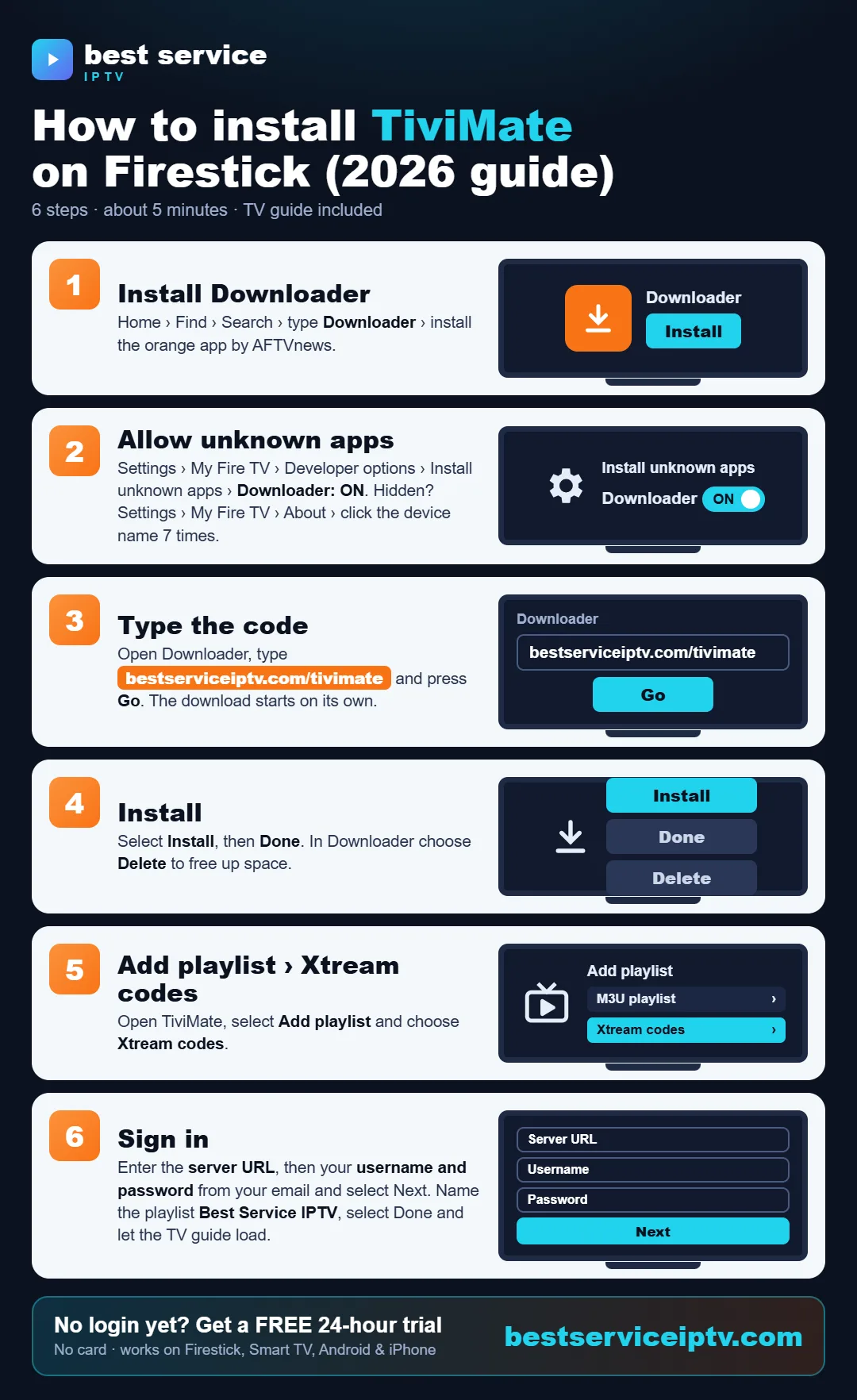
Share this infographic on your site
What you need
- A Fire TV Stick (4K or 4K Max recommended), Fire TV Cube or Fire TV smart TV.
- About 100 MB of free storage and a 10 Mbps+ connection (25 Mbps for 4K).
- Your IPTV login (Xtream Codes or M3U). No account yet? Start a free 24-hour trial.
Step 1: Turn on Developer options
- Open Settings › My Fire TV.
- If Developer options is missing, open About and click your device name 7 times.
Step 2: Install Downloader and allow unknown apps
- Search for Downloader (orange icon) and install it.
- Go to Settings › My Fire TV › Developer options › Install unknown apps and turn Downloader ON.
Step 3: Download TiviMate with Downloader
- Open Downloader, click the URL box and type bestserviceiptv.com/tivimate, then Go.
- Click Install, then Done, and delete the file to free space.
Step 4: Add your playlist (Xtream Codes)
- Open TiviMate and click Add playlist.
- Choose Xtream Codes (recommended) or M3U playlist.
- Enter the server URL (with http:// and port), your username and password, then Next.
- TiviMate detects the TV guide (EPG) automatically. Click Done.
No IPTV subscription yet? Get your IPTV login in minutes: 20,000+ live channels, 200,000+ movies & series, HD & 4K, IPTV subscription plans from $9.50 with no auto-renewal and 24/7 support — or try it free for 24 hours.
Order a subscription Free 24h trialStep 5: Load the TV guide and set favorites
- If the guide is empty, open Settings › EPG › Update EPG.
- Long-press a channel › Add to favorites to build your own list.
- Hide categories you never watch: Settings › Playlists › Manage groups.
TiviMate Premium: is it worth it?
TiviMate is free to use. Premium unlocks recording, multiple playlists, catch-up and more customization. It is bought through the TiviMate Companion app on an Android phone, then activated in TiviMate. If you only watch live TV, the free version is enough to start.
Common problems
| Problem | Fix |
|---|---|
| "App not installed" | Free storage, uninstall older versions, try again. |
| Empty TV guide | Settings › EPG › Update EPG, and wait for it to finish. |
| Buffering | Use 5 GHz Wi-Fi or Ethernet — see buffering fixes. |
| Login error | Check the URL (http:// and port) and case-sensitive details. |
Prefer something simpler? Try IPTV Smarters Pro on Firestick. Full TiviMate settings: TiviMate setup guide.
TiviMate vs IPTV Smarters Pro on Firestick
Both are excellent and both work with the same IPTV subscription. The choice is mostly about how you watch:
| TiviMate | IPTV Smarters Pro | |
|---|---|---|
| Best for | Live TV and sports, channel surfing like cable | Movies and series (VOD), beginners |
| TV guide (EPG) | Full cable-style grid, very fast | Simpler guide |
| Movies & series | Available, but basic layout | Posters, descriptions, resume playback |
| Recording / catch-up | Yes (Premium) | Catch-up on supported channels |
| Price | Free, Premium optional | Free |
| Setup guide | This page | IPTV Smarters Pro on Firestick |
Many of our customers install both: TiviMate for live channels and games, Smarters for movies. Compare more players in best IPTV apps for Firestick.
Best TiviMate settings for Firestick
- EPG update: Settings › EPG › turn on Update EPG on app start and keep a 12–24 h update interval, so the guide is always correct.
- Buffer size: Settings › Playback › Buffer size › Medium or Large if a channel stutters on Wi-Fi.
- Auto frame rate: Settings › Playback › turn it on with a 4K TV for smoother sports.
- Hide what you never watch: long-press a group › Hide, so the guide only shows USA, Canada, sports or the countries you want.
- Favorites: long-press a channel › Add to favorites; then put the Favorites group first.
- Firestick storage: keep at least 1 GB free — a full TV guide needs space. See how to clear cache on Firestick.
TiviMate Premium: recording and catch-up
Premium is bought in the TiviMate Companion app on an Android phone, then linked to your Firestick by signing in. It unlocks recording (to the Firestick or a USB drive with an OTG adapter), catch-up on channels that support it, multiple playlists and a customizable guide. The free version is enough to watch live TV; Premium is worth it if you record games or use catch-up a lot.
How to update TiviMate and put it on the home screen
- To update, open Downloader again, type
bestserviceiptv.com/tivimateand install over the old version: your playlist and settings are kept. - To pin it to the home screen, hold the Home button › Apps, select TiviMate, press the Menu (☰) button › Move to front.
- Once TiviMate works, you can delete the downloaded APK file in Downloader to free storage.
Want to know which games are on tonight and the channel to open in TiviMate? See live sports on TV tonight and the NFL TV schedule this week.
Frequently asked questions
Is TiviMate free on Firestick?
Yes, the basic version is free. Premium (recording, multiple playlists and more) is an optional paid upgrade.
Is TiviMate in the Amazon Appstore?
Availability varies. The reliable way is Downloader with the code bestserviceiptv.com/tivimate.
Does TiviMate work on Firestick Lite?
Yes, but a Fire TV Stick 4K or 4K Max gives a smoother TV guide and 4K playback.
Can I use TiviMate and IPTV Smarters Pro together?
Yes. Install both and log in with the same details; you can only stream on as many screens at once as your plan allows.
What is the Downloader code for TiviMate?
Type bestserviceiptv.com/tivimate in the Downloader app on your Firestick. It downloads the TiviMate installer directly.
How do I add the TV guide in TiviMate?
With Xtream Codes the TV guide is added automatically. Open Settings › EPG to update it if programs are missing.
TiviMate or IPTV Smarters Pro: which is better on Firestick?
TiviMate is better for live TV and sports thanks to its cable-style guide; IPTV Smarters Pro is easier for movies and series. Both are free and you can install both.
Ready to start? Get best service iptv on your device in minutes. Try it free for 24 hours, then choose a plan from $9.50 (USD, USA & Canada).
Start free trial See plans